



As we all know that Facebook is continuously focusing on its users piracy and security, and hence introducing new features regularly. Again Facebook have rolled out a new this thing for its users.
Add Trusted Contact on Facebook, this feature will help user alot in gaining or recovering the compromised accounts. If you have forgot your password or if your accounts get compromised then this features will help you to get back your account.
In this you have give 3 to 5 friends name (to whom you trust most), and these friends will help you to get back your accounts.
How to enable this features on your accounts.
To enable this features first of all log in to your accounts and goto Piracy Setting >> Security section (at the right side) of your account. If you have any problem then you can directly visit to this link for the Security section.
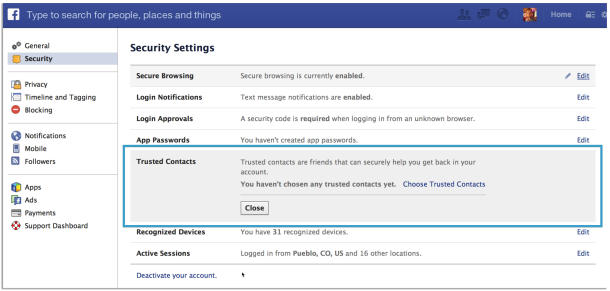
After this you will again received a new window where you will ask to enter a 3 to 5 trusted friends.
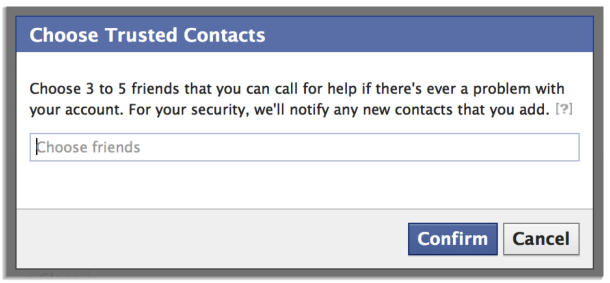
Here you have to enter minimum 3 friends and maximum 5 friends. So start typing your friends name, and finally click on the Confirm button.
And this you have done, with enable trusted Facebook contact features.
How this features will work
Here I will tell in brief how it will be helpful to the user in recovering there accounts. Hope you all will get all the points and steps.
Suppose you have forgotten your accounts password. In this scenario first you have to go Facebook account recover link. On account recover page you will asked to verify your account, after there you will asked the security code for recovering accounts. These code will be sent to the Trusted friends of your that you have added in the Trusted Contact.
Contact your friends for the codes by telling them to follow the same process. After getting the code insert it and confirm it. Thus you will get your account back.

Community Discussion
Join the conversation. Ask questions, share solutions, and help others.
Be the first to start the discussion!