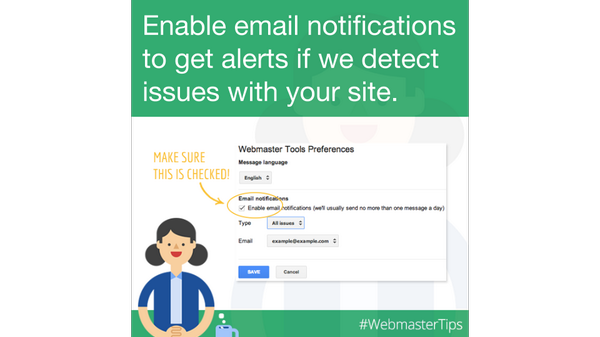
This is a good news for all blogger and Google webmaster tool users, that Google have added a new features on it webmaster tool service. Now Google will send a email notification to your associated email about the error that Google finds with your site.
Whenever Google finds a error with your site, which may be Error in crawling, broken links, spam or optimization issue, you will get the alert message in the inbox of your webmaster account. But now Google will also forward same error message to your associated email accounts also.
For the setting up the email notification and want to Forward your Webmaster tools message to email just follow below simple steps-
- On the Webmaster Tools home page, click the gear icon
.
- Click Webmaster Tools Preferences.
- In the Forward messages, select the email address you want to use. You can also change the language of the messages you receive.
Google will only display the email addresses associated with your Google Account. If the email address you want to use is not listed, you should add it to your Google Account.
For Add an email address to your Google Account just follow simple steps-
Also Read
- Sign in to Google Accounts.
- Under Personal settings, in the Email addresses section, click Edit.
- Add your email address.

Community Discussion
Join the conversation. Ask questions, share solutions, and help others.
Be the first to start the discussion!