



After a long time I am writing about the SEO. I have Write some of the post on SEO already and tells that how Google.com works. Google have its own algorithm. SEO helps us to increase reputation of your site on Google search engine. It helps to increase page rank, get to increase in search results, and help to drive a high traffic. Its automatically leads to increase our earnings.
I have shown you some of the Google videos on SEO also. If you haven’t seen yet get it from here..
KEY POINTS
Verifying a authorship is important key, that you can skipped out. It helps your visitors to connect you and also helps you in SEO terms. Writing a valuable content is the big thing for any author and Google gives respects to it, by giving a feature called verification of author. I will later on tell you how to verify the author also in my next post. But now lets starts to verify the Ownership of the site / blog.
You can verify ownership of any website. You can verify a sub domain (mydomain.example.com), Full domain (www.example.com), site directory (example.com/author) and much more….
Once you verify your site ownership then you can manage it well and you can also add owner/ manager…
VERIFYING YOUR SITE
For ownership verification there are many methods that Google provides.. For the Ownership first you have to signup for the Webmaster tool that Google provides. This is free tools for managing the site. Here you gets lots of options for managing your site and get a view on the configuration of your blog/site.
After signup click on the ADD SITE button at the dashboard and add your site there. After adding the site now you can verify your ownership by the following methods….
If you need any help then this video will help you at the below of this post.
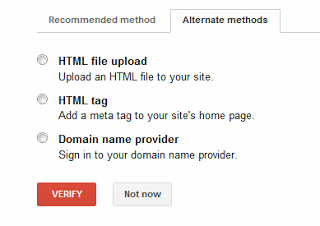
There is Two tab at the verification page but I recommend you go for Alternate method. This is easy way to verify ownership.
HTML FILE UPLOAD
If you can upload a file on the root directory of the site by accessing through cPanel or by ftp. For this you have place a HTML file in the main directory where your site index.html is found (www.example.com/verify.html).
HTML TAG
If you know HTML tags then it will be better option for you. I also recommend this to all the blogger as we cannot upload file in the blogger. Thus HTML tag will be the our option.
After selecting HTML tag option from there it will give you a html code inclosed in tag. you have to just copy that and paste it under <HEAD> tag and before </HEAD> tag.

DOMAIN NAME PROVIDER
Domain Name Provider option is for those site which has several sub domains of one domain. As like a “ABC company have a domain of www.abc.com then its subdomains are www.au.abc.com, br.abc.com, pk.abc.com . Here one domain have many sub domains. These type of domain mostly have with multinational company.
VIDEOS
Here is the Some Video tutorial for the Verification of Ownership of the site.
This Video is for Verify your site by adding a meta tag
Till now hope you have understand the Process of Verifying the ownership of Site or blog.
If you like the Post we feel nice to hear from you all. Thanks


Community Discussion
Join the conversation. Ask questions, share solutions, and help others.



Thanks buddy
Nice Article Vivek