
As we have already posted some of the new features that were introduce by the Google on its products, and Google keep on updating its products regularly.
As lastly Google have made a major change to is blogger products. Google have changed the whole designed of the Blogger template editor, and introduce awesome new things.
Againg Google have introduce a awesome new features for the blogger. Google Introduce Google plus commnets box for the blogger.
This features looks awesome and clean. This will not effects to your blog SEO also. Apart from this you can also track the comments on your Google plus post.
Integrating Google Plus comments with blogger blogs
Also Read
It is very easy to integrate Google plus comments box with to your blogger. This can be done very simple steps. For this
1) Login to your blogger dashboard.
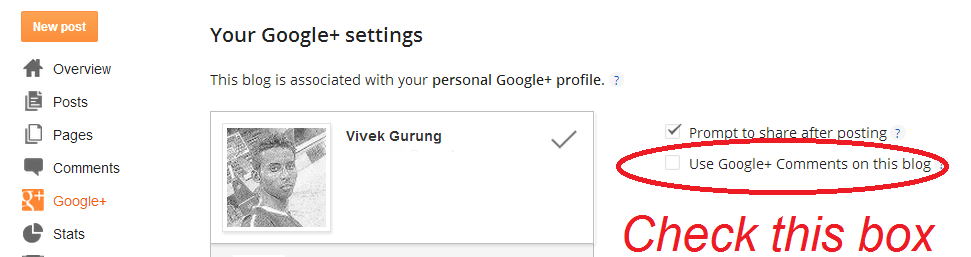
2) Click on the Google+ tab at the right bar of your dashboard.
3) Just check the “Use Google+ Comments on this blog“.
That it you have done..
Now see the change on the comment box of your blog post.
Note :- This features of Google+ comments will not work on custom Blogger Templates and some latest templates. For this you have to a simple code, soon i will update this post with the code.
Community Discussion
Join the conversation. Ask questions, share solutions, and help others.
Be the first to start the discussion!