


Microsoft has opened a public preview of Microsoft Defender for Endpoint on Linux desktops, extending the antivirus, endpoint detection and response (EDR) and vulnerability management tools it already runs on Linux servers to developer and engineering workstations. The company announced the preview on 14 October 2026. It said the desktops use the same agent, packages and deployment methods as servers, and every distribution Defender supports on servers is covered.
Microsoft’s case rests on who uses those machines. A developer’s Linux laptop routinely touches source code repositories, CI/CD pipelines (the automated systems that build and release software), cloud infrastructure and containers, Microsoft’s Megha Priya wrote in the announcement. Compromising one gives an attacker “a foothold in the pipelines that build and ship the organization’s software.”
The preview brings Defender’s full endpoint stack to those workstations. That includes next-generation antivirus, EDR, and threat analytics; Defender Vulnerability Management, device inventory, and security settings management; and advanced hunting, live response, and device isolation, which cuts a compromised machine off the network while keeping it connected to Defender. Security teams see Linux desktops in the same Microsoft Defender portal as the rest of their fleet.
Same agent, new server or workstation check
There is no separate desktop edition to install. Instead, Defender now determines on its own whether a Linux device is a server or a workstation. According to Microsoft’s prerequisites documentation, the agent checks a chain of signals that includes operating system metadata, subscription and licensing details, cloud and vendor metadata, image SKUs, Ubuntu Pro contracts and virtual desktop indicators. When those signals are inconclusive, Defender classifies the machine as a server by default.
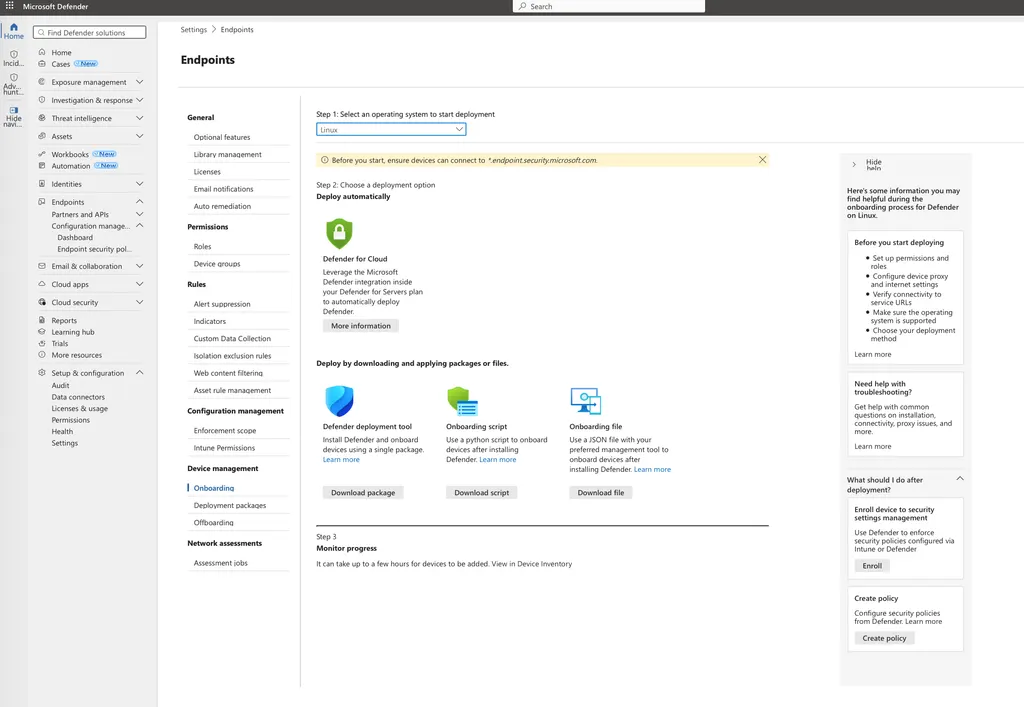
The distinction matters for licensing. Linux servers can be onboarded under Defender for Servers Plan 1 or Plan 2, Defender for Endpoint for servers, or Defender for Business servers. Desktops require Microsoft Defender for Endpoint Plan 2, which is also bundled in Microsoft 365 E5 and E7.
Support depends on the distribution and kernel, not the desktop environment, so GNOME, KDE and other desktops are all covered. On x64, the list includes Ubuntu LTS 16.04 through 26.04, Debian 9 to 13, Fedora 33 to 44, and Red Hat Enterprise Linux 7.2 through 10.x, SUSE Linux Enterprise Server 12 to 16 and openSUSE Leap 15.6 and 16, alongside Oracle Linux, Rocky Linux, AlmaLinux and CentOS. ARM64 coverage is narrower, starting at Ubuntu 20.04, Debian 11 and Fedora 40. The minimum kernel version is 3.10.0-327.
Distributions not on that list are unsupported. Microsoft says it will not block installation on customised systems derived from a supported vendor distribution, which would include Ubuntu derivatives such as Linux Mint. It does, however, treat those systems as outside its validated support baseline, and may ask customers to reproduce problems on a standard distribution. Arch Linux does not appear on the list at all.
The documentation also lists several catches relevant to desktops. The agent needs at least one CPU core, 1 GB of RAM, 2 GB of disk space and systemd. PAC, WPAD, and authenticated proxies are not supported, and SSL-inspecting proxies must be configured to allow Defender’s traffic to pass through untouched. Microsoft also warns that running Defender alongside another security tool that uses fanotify, the Linux kernel’s file-access monitoring interface, is unsupported and can cause system hangs unless Defender’s antivirus is set to passive mode.
Cost and trust questions
Petri news editor Rabia Noureen noted that the move gives security teams more consistency, but the Plan 2 requirement adds licensing cost and ties Linux endpoint protection to Microsoft’s security stack. Earlier objections to Defender on Linux centred on data collection.
When the server product reached general availability in June 2020, Hacker News commenters questioned how much telemetry it would send to Microsoft, and one reported finding telemetry calls in the installation scripts. Another argued that companies in the US defence supply chain would be required to run such tools regardless.
Performance is the other open question. Microsoft’s own troubleshooting guide warns that some applications may run with suboptimal performance under the agent, and it recommends adding exclusions for the processes that trigger the most scans. Developer workstations that compile code and pull container images all day are exactly the file-heavy machines Microsoft is now targeting.
The desktop preview had appeared in the documentation before the announcement. Defender’s what’s new page lists it under September 2026, alongside a preview of memory scanning for Linux, which inspects running processes for threats that never touch the disk. Antivirus and tamper-protection audit modes for Linux arrived in August.
Organisations join the preview by onboarding eligible workstations with any existing deployment method. Individual Linux users have nothing to install, since there is no standalone or consumer version. Microsoft has not provided a date for general availability, and its documentation does not specify how a desktop Defender misclassified as a server is counted for licensing.

Community Discussion
Join the conversation. Ask questions, share solutions, and help others.
Be the first to start the discussion!