

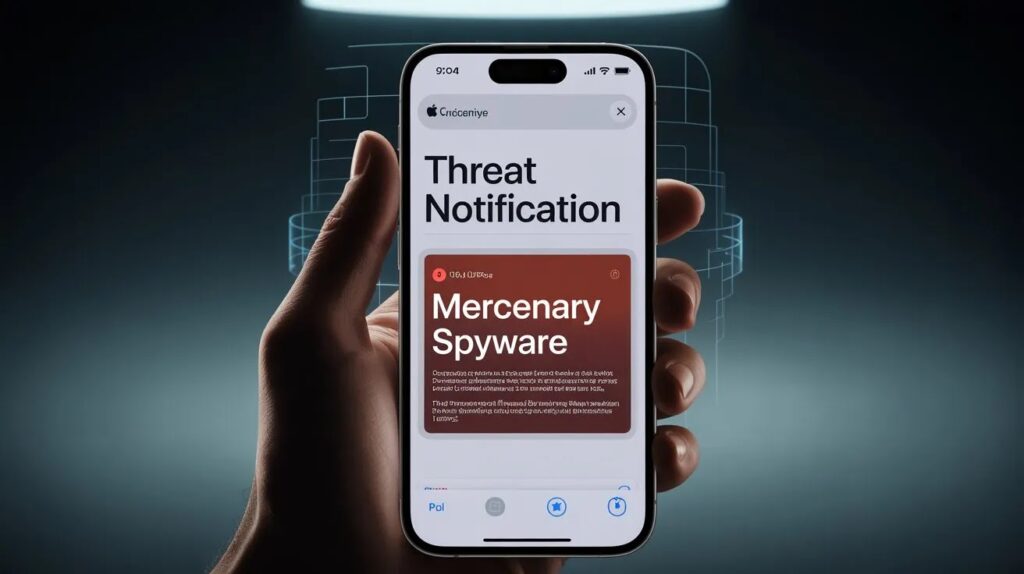
Apple sent a fresh round of mercenary spyware threat notifications to users in 110 countries on Thursday, and for the first time, the warning lands as a push alert on the iPhone Lock Screen instead of an email that can sit unread for a week. Apple confirmed the round’s scale to TechCrunch and published a revised support page describing the new delivery method the same day.
The delivery change is the part that matters. Apple has issued these alerts since 2021 and has now reached users in more than 150 countries, but the warnings travelled through email, iMessage, and a banner buried on the Apple Account website — channels that at-risk people routinely miss, filter as spam, or dismiss as phishing. A Lock Screen banner backed by a permanent row in Settings removes that excuse. Whether someone acts on the alert is now a decision rather than an accident.
What Changed in How Apple Sends Threat Notifications
Apple’s updated support document lists four delivery channels for a threat notification:
- An Apple Threat Notification alert on the iPhone Lock Screen
- A dedicated Apple Threat Notification row near the top of Settings, carrying a red badge
- An email from
[email protected] - A banner at the top of the user’s Apple Account page after signing in at account.apple.com
Two details on that page are easy to skim past. First, Apple states that notification types may vary by device model and software version, which means the Lock Screen alert is not guaranteed for everyone — users on older hardware or older iOS builds may still receive only the email notification. Second, Apple’s current page no longer lists iMessage as a delivery channel, even though earlier rounds were sent that way. Apple told TechCrunch it had reworked the experience so that recipients can reach the recommended next steps more quickly.
John Scott-Railton, a senior researcher at the University of Toronto’s Citizen Lab, was the first to publicly flag the new round and described the push alerts as a significant improvement. He told TechCrunch that notifications “create a critical signal that a community is being targeted”, because a handful of recipients seek help, and those requests usually open investigations that surface far more victims than the original alert reached.
What the Apple Threat Notification Actually Says
The Lock Screen alert is titled Apple Threat Notification and tells the recipient that “Apple detected a mercenary spyware attack targeted at your iPhone”, followed by a line saying there are actions they can take now to help protect their data and device. Tapping it opens the full advisory with recommended steps, including enabling Lockdown Mode and contacting expert help.
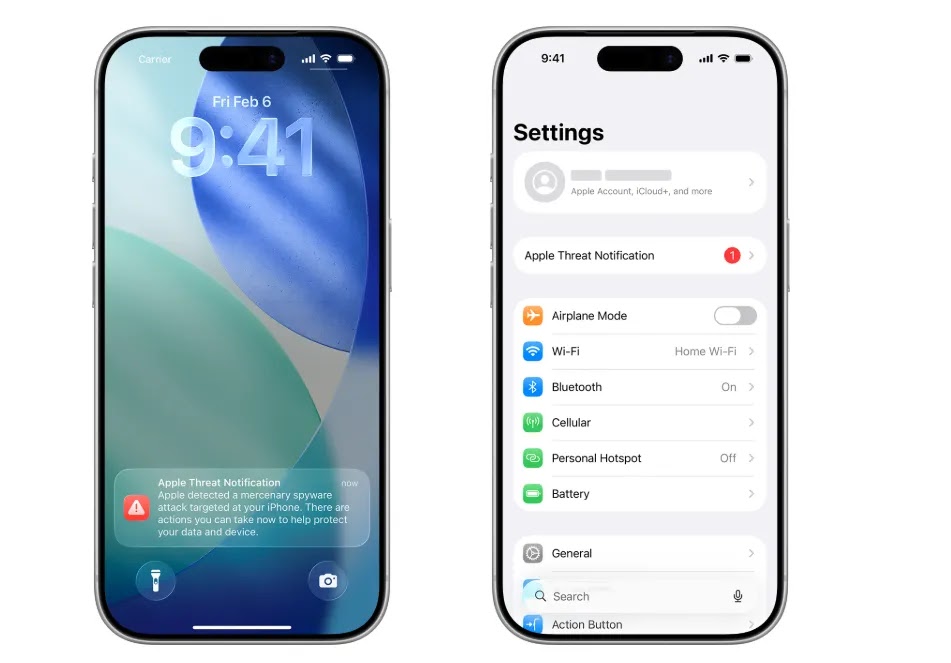 |
| Apple threat notification on the Lock Screen | Image- Apple |
Apple describes these as high-confidence alerts and says they should be taken very seriously, while conceding that its investigations can never reach absolute certainty. It will not explain what triggered any individual notification, because publishing detection criteria would allow spyware operators to tune their behavior to avoid detection. Apple also refuses to attribute the attacks to any government, company, or region — a deliberate position it has held through every round, including the politically explosive ones.
How to Tell a Real Apple Threat Notification From a Fake
This question matters more today than it did last week. The format of a genuine alert is now public, screenshots are circulating widely, and the population being targeted is exactly the population that will act quickly on a frightening message. Expect imitation — spoofed emails, forwarded WhatsApp screenshots, fake “spyware removal” services, and phishing pages built to look like the Apple Account banner.
Apple’s own rules make verification simple:
- A real threat notification never asks you to click a link, open a file, install an app or configuration profile, or supply your Apple Account password or a verification code — not by email, not on a phone call.
- To confirm one, type account.apple.com into your browser yourself and sign in. If Apple sent you a notification, it appears as a banner at the top of the page. Do not use a link from the message you are checking.
- Check Settings on the iPhone. A genuine notification creates its own row with a badge.
- The legitimate email comes from
[email protected], but treat any sender address as weak evidence on its own. The account page is the check that settles it.
Anyone who calls, messages, or emails offering to “clean” your device after an Apple alert should be treated as hostile until proven otherwise. Apple does not provide outbound support for this, and no one outside Apple knows why you were flagged.
What to Do If You Receive an Apple Threat Notification
- Do not factory reset the phone immediately. A wipe destroys the forensic traces an investigator needs to confirm what happened. Digital security responders generally ask targets to preserve the device state first.
- Turn on Lockdown Mode — Settings > Privacy & Security > Lockdown Mode. Enable it on every Apple device signed into the same account, not just the iPhone.
- Update to the current OS. As of August 2026, that is iOS 26.6, released on 27 July. Turn on automatic updates if they are off.
- Contact the Digital Security Helpline at Access Now. It is free, runs 24 hours a day, seven days a week, and Apple points recipients to it by name. Outside organisations have no information about why Apple flagged you, but they can provide tailored advice and conduct a forensic analysis.
- Secure the account from a different, trusted device. Change the Apple Account password, review every device signed in, confirm your two-factor trusted numbers, and check Settings > General > VPN & Device Management for configuration profiles you did not install.
- Warn the people you talk to. If a device was compromised, the exposure includes your conversations, which means it includes sources, colleagues and family who never got an alert of their own.
A notification means Apple believes you were targeted. It is not a confirmation that the attack succeeded. Both facts are worth holding at the same time.
Every Apple Threat Notification Round Since 2021
Apple has never published a running log of these rounds, so the picture has to be assembled from its support-page revisions and from the reporting each wave generated. Here is the sequence as it currently stands.
| Date | Scope | Notable detail |
|---|---|---|
| November 2021 | First round | Programme launched weeks after Apple sued NSO Group; wording referred to “state-sponsored attackers” |
| 31 October 2023 | Global, India prominent | More than 20 Indian opposition MPs and journalists went public, triggering a political confrontation in Delhi |
| 10 April 2024 | 92 countries | Apple switched its language from “state-sponsored attackers” to “mercenary spyware” |
| July 2024 | 98 countries | Second round inside four months |
| 29–30 April 2025 | 100 countries | Italian journalist Ciro Pellegrino and Dutch activist Eva Vlaardingerbroek confirmed receiving alerts |
| Mid-2025 | Iran | More than a dozen Iranian targets were alerted in the run-up to the war with Israel, as reported in July |
| 13 August 2026 | 110 countries | First round delivered as an iPhone Lock Screen push; support page rewritten |
Apple has never disclosed how many individuals it has notified in total, only how many countries they sit in. The country count has climbed every year the programme has run.
Does Lockdown Mode Actually Stop Mercenary Spyware?
The evidence is stronger than it was a year ago. In March 2026, an Apple spokesperson told TechCrunch the company is not aware of any successful mercenary spyware attack against an Apple device with Lockdown Mode switched on — nearly four years after the feature shipped in iOS 16.
Donncha Ó Cearbhaill, who heads Amnesty International’s Security Lab and has investigated dozens of these cases, said the same: there was no evidence that an iPhone was compromised while Lockdown Mode was active at the time of the attack. Citizen Lab has separately documented instances in which Lockdown Mode blocked live attempts, including one using NSO Group’s Pegasus and another using Predator.
The most persuasive endorsement came from the attackers. When Google’s Threat Intelligence Group dissected the Coruna iOS exploit kit in March 2026, it found the kit checks whether Lockdown Mode or private browsing is active and quietly declines to run if either is — a design choice that only makes sense if the operators expected to fail and did not want to burn their exploits proving it.
The honest caveat: an absence of observed bypasses is not proof that none exist. Apple is tight-lipped, investigators see only what victims bring them, and a bypass held by one vendor against a handful of targets could stay invisible for years. What can be said with confidence is that Lockdown Mode removes entire classes of delivery — most message attachment types, several WebKit features, link previews, unsolicited FaceTime calls, configuration profile installation — and that shrinking the remotely reachable surface forces attackers into more expensive, more fragile chains.
The cost to a normal user is real but modest: some links have to be copied into a browser manually, some attachments will not open, and shared albums stop working. For anyone who has received a threat notification, that trade is not close.
Why India Turns Up in Every Threat Notification Cycle
India has been the most politically charged destination for these alerts since 31 October 2023, when more than 20 opposition MPs and journalists said they had received them. The named recipients included Mahua Moitra of the Trinamool Congress, AIMIM chief Asaduddin Owaisi, Congress leaders Shashi Tharoor, Pawan Khera and Supriya Shrinate, Shiv Sena (UBT) MP Priyanka Chaturvedi, and The Wire founding editor Siddharth Varadarajan.
The government’s response was to question the alerts rather than the targeting. IT ministry officials publicly cast doubt on Apple’s findings and announced a CERT-In inquiry into device security. The Washington Post subsequently reported that senior officials had summoned Apple representatives and pressed the company to offer alternative explanations for the warnings. Two months later, Amnesty International’s Security Lab published forensic findings placing Pegasus on the iPhones of Indian journalists, including Varadarajan and Anand Mangnale of the Organized Crime and Corruption Reporting Project. When Apple ran its 92-country round in April 2024, Indian users were again among the recipients.
The legal position has not moved much. The Pegasus petitions, heard as Manohar Lal Sharma v. Union of India, remain before the Supreme Court, and the technical committee’s report is still sealed. During hearings in April 2025 the bench observed orally that a country possessing spyware for security purposes is not itself objectionable and that the real question is who it is used against, while indicating the court may inform individuals whose privacy was breached rather than publish the report in full.
Which leaves a practical asymmetry worth stating plainly. No Indian law requires anyone to tell you that your phone was targeted. There is no domestic notification mechanism, no regulator that issues these warnings, and no obligation on a telecom operator or agency to disclose after the fact. For an Indian journalist, lawyer or opposition worker, an Apple threat notification is very often the only notice they will ever get that someone spent money to read their messages.
What the Attacks Look Like in 2026
Two developments this year explain why Apple is pushing harder on delivery.
February 2026 — CVE-2026-20700. Apple patched a memory corruption flaw in dyld, the dynamic linker that loads system libraries at runtime, in iOS 26.3 and the matching releases. Google’s Threat Analysis Group reported it, and Apple’s advisory said the issue may have been exploited in an “extremely sophisticated attack against specific targeted individuals” on versions of iOS before iOS 26. Apple linked it to CVE-2025-14174 and CVE-2025-43529, the WebKit zero-days fixed in December 2025, indicating a chain rather than an isolated bug. CISA added it to the Known Exploited Vulnerabilities catalogue.
March 2026 — the Coruna exploit kit. Google’s Threat Intelligence Group disclosed a JavaScript-delivered framework containing five complete iOS exploit chains and 23 individual exploits covering iOS 13.0 through 17.2.1. Its ownership history is the alarming part: GTIG tracked it from a commercial surveillance vendor’s customer, to UNC6353, a suspected Russian espionage group running watering-hole attacks against Ukrainians, and finally to UNC6691, a financially motivated Chinese actor draining cryptocurrency wallets. iVerify called it the first observed mass exploitation against iOS devices. CISA added three of the underlying CVEs to KEV on 5 March.
That trajectory is the real story of the year. A capability that cost millions and was reserved for a dozen targets ends up, a few resales later, spraying at anyone who visits the wrong website. The reasoning “I am not a journalist, so this does not concern me” held better in 2022 than it does now.
Apple’s structural answer arrived in September 2025 with Memory Integrity Enforcement, built on the A19 and A19 Pro chips in the iPhone 17 line and iPhone Air using Arm’s Enhanced Memory Tagging Extension. It targets the memory-corruption class that every known iOS spyware chain has depended on, and Apple’s argument is not that exploitation becomes impossible but that chains become too expensive and too fragile to maintain. That is a five-to-ten-year bet, and it does nothing for the hundreds of millions of older iPhones still in circulation, which is precisely the population Coruna went after.
Guidance for Everyone Who Did Not Get an Alert
Apple’s position is that the vast majority of users will never be targeted by mercenary spyware, and that is accurate. Its baseline recommendations still apply:
- Keep devices on the latest software, which carries the latest security fixes
- Protect the device with a passcode, Touch ID or Face ID
- Use two-factor authentication and a strong, unique Apple Account password
- Turn on Stolen Device Protection
- Install apps only from the App Store
- Use unique passwords and passkeys where available
- Do not open links or attachments from unknown senders
One addition of our own: turn on automatic updates and leave them on. The Coruna campaign showed that unpatched older iPhones are now bulk targets rather than individual ones, and the gap between a patch shipping and a device receiving it is the entire window an opportunistic operator needs.
If you have not received a notification but have a concrete reason to believe you are a target — because of your reporting, your litigation, your organising or your office — Apple’s advice is to enable Lockdown Mode without waiting for an alert.
Frequently Asked Questions
Is the Apple Threat Notification real or a scam?
Genuine notifications exist, and Apple has sent them since 2021. To verify yours, sign in at account.apple.com by typing the address yourself. A real notification appears as a banner at the top of the page after sign-in, and also as a dedicated row in Settings on the iPhone. Apple never asks you to click a link, install a profile, or give up your password or verification code.
Does a threat notification mean my iPhone has already been hacked?
No. It means Apple has high confidence that you were individually targeted. The attempt may have failed. Apple does not tell recipients whether the attack succeeded, which is one reason it recommends contacting a specialist who can examine the device.
Why won’t Apple tell me who attacked me?
Apple does not attribute threat notifications to any attacker, company or region, and will not describe what triggered a specific alert. Its stated reason is that publishing detection criteria would help spyware operators adapt and evade future detection.
Should I factory reset my iPhone after getting an alert?
Not as a first step. A reset destroys the evidence that an investigator would use to establish what happened and whether the compromise succeeded. Preserve the device, enable Lockdown Mode, and contact the Digital Security Helpline at Access Now before wiping anything.
Does Lockdown Mode slow down or break the iPhone?
It does not affect performance. It disables features commonly abused for delivery: most message attachment types, some web technologies, link previews, unsolicited FaceTime calls and configuration profile installation. Most people find the daily cost minor compared with the exposure it removes.
How much does an expert help cost after an Apple threat notification?
Nothing. The Digital Security Helpline run by the nonprofit Access Now is free and available 24 hours a day, seven days a week. Apple points notification recipients to it directly. Treat anyone charging money to “remove spyware” after an alert as a scam.
Can Android users get similar warnings?
Google and WhatsApp both operate their own notification programmes for government-backed attack targets, though the wording, delivery and frequency differ from Apple’s. There is no cross-platform standard, which is why the same person can be alerted by one company and never hear from another.
Community Discussion
Join the conversation. Ask questions, share solutions, and help others.
Be the first to start the discussion!