


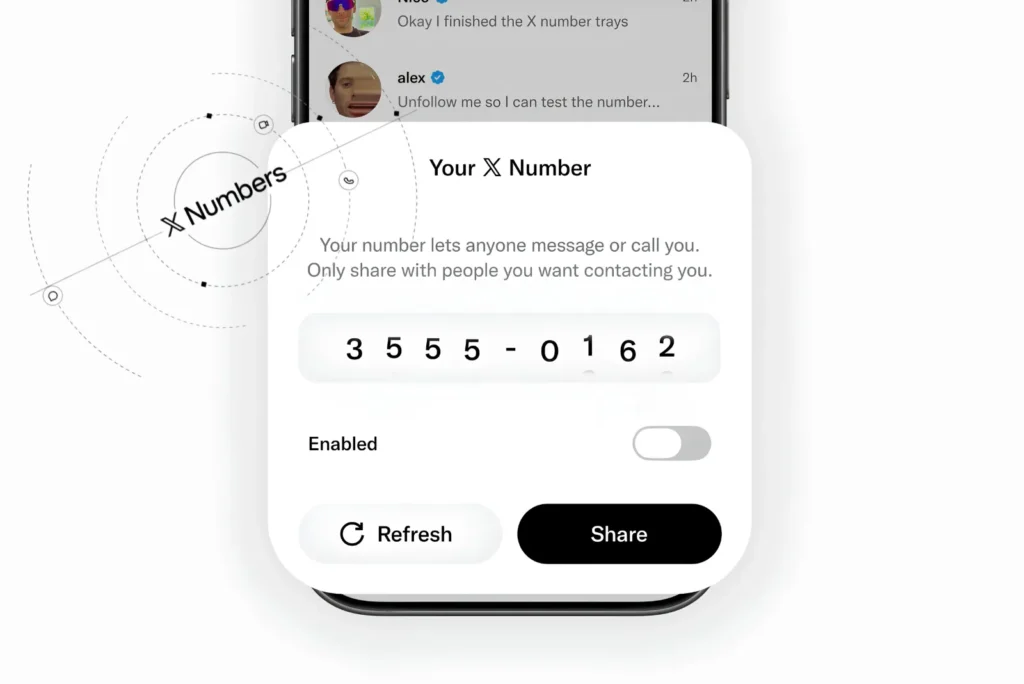
X has launched X Numbers, an optional private code that lets anyone message or call you in X Chat even if you don’t follow them and even if your inbox is closed to strangers. X announced the feature on 22 September 2026 through its @chat account. A conversation that starts with your X Number goes straight to your main Chat inbox instead of being sent as a message request.
An X Number is not a phone number, nor is it the safety number X Chat uses to verify encrypted conversations. To create one, open Chat, enter your Chat PIN if asked, open the inbox dropdown menu, and tap Number. From there, you can turn the code on or off, share it, or refresh it. Refreshing replaces the code, so anyone holding only the old X Number can no longer use it to start a new conversation with you.
What Is an X Number on X?
An X Number is a private contact code tied to your X Chat inbox. It works like a key: whoever enters your enabled X Number can message you and, depending on your call settings, call you. That holds even if you don’t follow that person back. X’s Help Center is explicit about what the code is not:
Your X Number is not a phone number.
Having an X Number is optional. It adds a way for people to reach you, and it does not change what others see when they try to message you. If your inbox already accepts message requests, people can still message you without it.
How X Numbers Change Who Can Message You
X Numbers matter most if you run a closed inbox, meaning people you don’t follow cannot message you. Before X Numbers, a closed inbox was an absolute barrier. As of 23 September 2026, it becomes a selective one: people you choose to give your code to can get through.
| Who is contacting you | Open inbox (accepts requests) | Closed inbox, X Number off | Closed inbox, X Number on |
|---|---|---|---|
| Someone you follow | Main inbox | Main inbox | Main inbox |
| Someone you already have a Chat with | Main inbox | Main inbox | Main inbox |
| Member of the same Premium Business or Premium Organization | Main inbox | Main inbox | Main inbox |
| Stranger without your X Number | Message requests | Blocked | Blocked |
| A stranger who enters your X Number | Main inbox | Blocked | Main inbox, and can call if your call settings allow |
Message requests on X are capped per 24 hours by subscription tier, according to X’s Help Center: 7 for free accounts, 35 for Premium, 75 for Premium Plus, and 500 for Premium Business. X has not said whether a message sent through an X Number counts toward that cap.
How to Create, Share, Turn Off, or Refresh Your X Number
X Numbers live inside Chat, in both the main X app and the standalone XChat app:
- Open Chat in the X app or the XChat app.
- Enter your Chat PIN if prompted.
- Open the inbox dropdown menu.
- Tap Number.
The Number sheet has these controls:
- Enabled: switch on to start using your X Number, switch off to stop it working.
- Share: send the code to people you want to hear from.
- Refresh: generate a new code; the old one stops working for new contacts.
- Hide from others: stop people you’ve already chatted with from seeing your X Number.
Chat also marks conversations that were started with your X Number. If an unwanted contact gets through, you can refresh or disable the code right away. Blocking that account is a separate step.
Why X Asks for an X Number When You Message Someone
If you try to message an account with a closed inbox, X shows that the inbox is closed and asks for the person’s X Number. The prompt does not mean the person actually has one. X shows it even to accounts that never created an X Number or have switched theirs off, so nobody can use the prompt to check who has a number.
A Message button can also appear on a closed-inbox profile, and you can open the conversation screen. You still can’t send anything unless one of these is true:
- The person follows you;
- you already have a Chat with them; or
- you enter their enabled X Number.
If the account’s inbox accepts message requests, the X Number prompt does not appear. Your message goes to their requests as before.
Turning off or refreshing your own X Number does not prevent others from seeing the prompt on your profile. It only decides whether the code they enter actually reaches you.
Who Can See Your X Number
By default, anyone you’ve already exchanged messages with in a direct conversation can see your X Number, and they can pass it on to others. Anyone who has your current code can message or call you while it’s enabled, even if you don’t follow them.
Two settings contain this:
- Turn on Hide from others in the X Number sheet so past contacts can’t see the code.
- Refresh the code whenever it spreads further than you intended.
Can Someone Call You With Your X Number?
Yes. Someone who enters your enabled X Number can call you in Chat, but only if your call settings allow it. You set who can call you in Chat settings. The options are:
- people in your address book;
- people you follow;
- Verified users, or
- everyone.
Calls carry a separate privacy risk. X’s calling documentation states that when neither person has Enhanced call privacy enabled, the call runs peer-to-peer. That means each side may be able to see the other’s IP address, and the setting is off by default. If you turn it on, X relays the call through its own servers and masks your IP address. Anyone planning to share an X Number widely should enable it first.
X Number vs Phone Number vs Safety Number vs Username
| Identifier | What it does | Public? | Can you change it? |
|---|---|---|---|
| X Number | Lets the holder message or call you in Chat past a closed inbox | Private; visible to past Chat contacts unless hidden | Yes, refresh or turn off anytime |
| Phone number | Not used for X Chat contact | Not shown by X Numbers | Not applicable |
| Chat safety number | Verifies that an encrypted Chat is with the right person | Shown to both people in a Chat | Derived from both users’ public keys |
| @username | Identifies your public X account | Public | Yes, via account settings |
Are Messages Sent With an X Number End-to-End Encrypted?
X’s documentation doesn’t say whether a Chat started through an X Number is end-to-end encrypted from the first message. The encryption eligibility rules in the Help Center list the recipient following the sender, a previous exchange, an accepted encrypted Chat, or a shared Premium Business or Premium Organization. X Numbers are not on that list.
For comparison, a standard message request stays unencrypted until the recipient accepts it. X then notifies both people when the conversation becomes encrypted. Watch for that notice in any conversation that starts with an X Number.
Three limits of X Chat encryption apply to every conversation, according to X:
- Metadata such as the recipient and creation time is not encrypted.
- The system does not offer forward secrecy, so a compromised device key exposes that device’s past messages.
- Adding Grok to a Chat removes end-to-end encryption while Grok is present.
How Many Digits Is an X Number?
Reports disagree on the length of an X Number, and X’s Help Center does not give one. Social Media Today, citing a user’s screenshot from 10 September 2026, described a 10-digit code. Forbes described an eight-digit code on 22 September 2026. X has not confirmed either figure.
Who Can Get an X Number, and Does It Cost Anything?
X Numbers are part of Chat, which works in the X app on iOS and Android, on the web, and in the standalone XChat app. X’s Help Center lists no subscription requirement for creating an X Number, unlike X Money, which is limited to Premium subscribers. X is still rolling out the feature, so it may not appear on every account yet.
X Numbers Timeline
| Date | Event |
|---|---|
| 14 November 2025 | X launches the rebuilt, encrypted Chat messaging system |
| 28 August 2026 | Feature tester @blankspeaker shows X Numbers in testing |
| 10 September 2026 | Users start seeing X Numbers as the rollout begins |
| 22 September 2026 | X officially announces X Numbers through @chat and documents the feature in its Help Center |
What to Do Before You Share Your X Number
- Turn on Enhanced call privacy in Chat settings to prevent strangers from seeing your IP address on calls.
- Set who can call you to something narrower than Everyone if you only want messages.
- Switch on Hide from others if you don’t want past contacts to see and reshare your code.
- Use a separate refresh cycle for different purposes, such as refreshing after a project, event, or hiring round ends.
- If spam arrives through the code, refresh it first, then block the individual accounts.



Community Discussion
Join the conversation. Ask questions, share solutions, and help others.
Be the first to start the discussion!