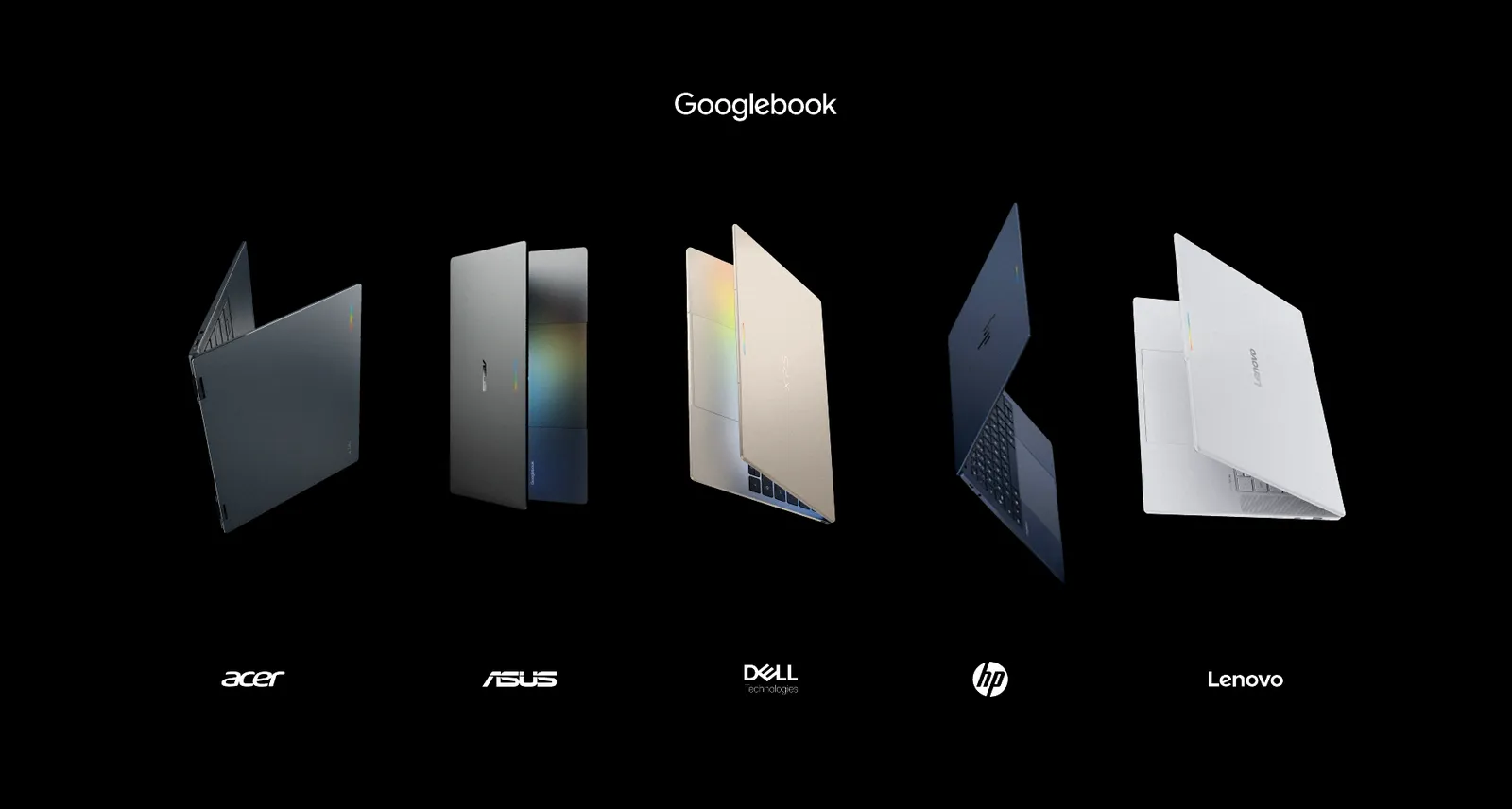
Google opened pre-orders for the first Googlebook laptops on 21 September 2026, with five models from Acer, ASUS, Dell, HP, and Lenovo priced from $899 to $1,299 in the US. The Acer Googlebook 14 costs $899, the Lenovo Googlebook 15 costs $1,099, the Dell XPS Googlebook costs $1,199, and the ASUS Googlebook 14 and HP Googlebook 14 cost $1,299 each, according to Google’s Googlebook store.
Every Googlebook runs Googlebook OS, an Android-based operating system that Google developed under the codename Aluminium OS and says will receive feature drops and updates for up to 10 years. All five US launch configurations pair 16 GB of RAM and 512 GB of storage with an Intel Core Ultra or Qualcomm Snapdragon X Elite processor, and each purchase includes 12 months of Google AI Pro. Google Books reached US shelves on 4 October 2026 and arrived in Canada, the UK, Ireland, France, Germany, and Australia on 5 October, Google said.
How Much Does Each Googlebook Cost?
The Acer Googlebook 14 is the cheapest Googlebook at $899, and the ASUS Googlebook 14 and HP Googlebook 14 are the most expensive at $1,299 each, based on Google’s store listings as of 21 September 2026. Google lists one US configuration for every Googlebook, with 16 GB of RAM and 512 GB of storage, and says its prices are based on MSRP (manufacturer’s suggested retail price).
| Googlebook model | US price (MSRP) | Canada price | Processor | Sold by (US) |
|---|---|---|---|---|
| Acer Googlebook 14 | $899 | CA$1,299 | Intel Core Ultra 5 | Best Buy, Google Store |
| Lenovo Googlebook 15 | $1,099 | CA$1,799 | Intel Core Ultra 5 | Best Buy, Google Store |
| Dell XPS Googlebook | $1,199 | CA$1,699 | Snapdragon X Elite | Best Buy, Google Store |
| ASUS Googlebook 14 | $1,299 | CA$1,799 | Intel Core Ultra 7 | Best Buy |
| HP Googlebook 14 | $1,299 | CA$1,799 | Snapdragon X Elite | Best Buy |
Canadian Googlebook pricing starts at CA$1,299 for the Acer Googlebook 14, with the Dell XPS Googlebook at CA$1,699 and the ASUS, HP, and Lenovo models at CA$1,799. The Lenovo Googlebook 15 costs $200 more than the Acer Googlebook 14 in the US and CA$500 more in Canada, based on those figures. Google has not published Googlebook prices for India.
How Do the Five Googlebook Laptops Compare?
All five Googlebooks ship with 16 GB of RAM, 512 GB of storage, a touchscreen, a backlit keyboard and a fingerprint reader in their US configurations, according to Google’s official data. The Googlebook models differ in screen size, panel type, processor, weight, sign-in options and claimed battery life.
Also Read
| Spec | Acer Googlebook 14 | ASUS Googlebook 14 | Dell XPS Googlebook | HP Googlebook 14 | Lenovo Googlebook 15 |
|---|---|---|---|---|---|
| US price | $899 | $1,299 | $1,199 | $1,299 | $1,099 |
| Display | 14-inch 2.8K OLED touch | 14-inch 2.8K OLED touch | 13.4-inch 2.5K LCD touch | 14-inch 2.8K OLED touch | 15.3-inch 2.8K OLED touch |
| Processor | Intel Core Ultra 5 | Intel Core Ultra 7 | Snapdragon X Elite | Snapdragon X Elite | Intel Core Ultra 5 |
| NPU | Up to 49 TOPS | Up to 49 TOPS | Up to 45 TOPS | Up to 45 TOPS | Up to 47 TOPS |
| RAM/storage | 16 GB / 512 GB | 16 GB / 512 GB | 16 GB / 512 GB | 16 GB / 512 GB | 16 GB / 512 GB |
| Battery (Google claim) | Up to 16 hrs | Up to 16 hrs | Up to 18 hrs | Up to 19 hrs | Up to 13 hrs |
| Weight | 2.51 lb (1.14 kg) | 2.2 lb (1.00 kg) | 2.2 lb (1.00 kg) | 2.74 lb (1.24 kg) | 2.84 lb (1.29 kg) |
| Security | Titan C2 chip | Titan C chip | Titan C2 chip | Titan C2 module | Titan C2 module |
| Sign-in | Fingerprint | Fingerprint | Fingerprint | Fingerprint, face | Fingerprint, face |
| Design | 2-in-1 convertible | Laptop | Laptop | Laptop | Laptop |
| Thickness (reported) | 13.9 mm | Not listed | 12.7 mm | 14 mm | 15.95 mm |
Compare the five Googlebook laptops
Rank the launch lineup, narrow it to what you need and check specs side by side. Prices and specs as listed on 21 September 2026.
The interactive chart needs JavaScript. The full Googlebook spec table is in the article above.
Key differences between the five Googlebooks
- The Acer Googlebook 14 is the only 2-in-1 convertible in the launch lineup, according to Google, and the cheapest Googlebook at $899.
- The ASUS Googlebook 14 and the Dell XPS Googlebook are the lightest Googlebooks, at 2.2 lb (1.00 kg) each.
- The HP Googlebook 14 has the longest claimed battery life in the lineup, at up to 19 hours of web browsing.
- The Lenovo Googlebook 15 has the largest screen, a 15.3-inch 2.8K OLED panel, and the shortest claimed battery life, at up to 13 hours.
- The Dell XPS Googlebook is the only launch Googlebook with an LCD panel; the other four models use OLED.
- The HP Googlebook 14 and the Lenovo Googlebook 15 are the only Googlebooks that support face unlock.
- The ASUS Googlebook 14 is the only Googlebook with an Intel Core Ultra 7, and the only model Google lists with a Titan C chip rather than Titan C2.
Which Operating System Does Googlebook Run?
Googlebooks run Googlebook OS, the name appears on Acers’ press release. Googlebook OS was developed under the codename AluminiumOS, sometimes shortened to ALOS. Google’s Peter Du told The Verge in May 2026 that Aluminium was the codename and not the official branding, as quoted by Daring Fireball.
Googlebook OS is built on Android. Google’s FAQ describes Googlebooks as combining ChromeOS and Android technology, and 9to5Google, which used the software before launch, reported that the Googlebook OS Settings app matches the one on Pixel phones and the app drawer is essentially the Pixel Launcher. Quick Settings and notifications sit in the top-right corner of Googlebook OS, following Android rather than the bottom-corner layout of ChromeOS, according to 9to5Google.
What Googlebook OS includes
- Android apps install from the Google Play Store and run directly on a Googlebook, according to Google’s Googlebook FAQ.
- The Chrome browser on Googlebook OS supports extensions and a vertical tab list.
- Gmail and Google Calendar open on Googlebook OS as Trusted Web Activities (web apps packaged and distributed through the Play Store) rather than as Android apps.
- Gemini Nano, Google’s on-device AI model, powers Magic Pointer, Rambler, Create My Widget, and searchable screenshot descriptions on Googlebook OS through a mix of on-device and cloud processing.
- A full Linux terminal environment is available to developers on Googlebook OS, and Google says it runs coding tools such as Claude Code and Antigravity CLI.
- Google Antigravity, Google’s app-building tool, comes with every Googlebook.
- Microsoft Word, Excel, Outlook, and PowerPoint files open, edit, and save on a Googlebook through the Microsoft 365 app, according to Google’s FAQ.
Who ships Googlebook OS updates?
Google, not Acer, ASUS, Dell, HP or Lenovo, rolls out Googlebook OS updates, 9to5Google reported. Major Googlebook OS releases follow Android’s quarterly platform release (QPR) schedule, and security updates can ship between them, according to the same report. Laptop makers can preload apps on a Googlebook but cannot make heavy interface changes, so Googlebook OS looks the same on all five brands.
Google promises Googlebook OS “regular feature drops and updates for up to 10 years.” Googlebook OS updates install in the background without interrupting the user.
Is Googlebook the Same as a Chromebook?
No. Googlebook is a separate category of flagship laptops, and Chromebooks continue to run ChromeOS, according to Google’s FAQ. Google describes Chromebooks as built for simplicity, speed, and everyday use, and Googlebooks as flagship laptops with premium materials, Gemini Intelligence features, and deeper Android phone integration.
| Googlebook | Chromebook | |
|---|---|---|
| Operating system | Googlebook OS (Android-based) | ChromeOS |
| Google’s positioning | Flagship laptops with premium materials | Simplicity, speed and everyday use |
| Gemini Intelligence features | Magic Pointer, Rambler, Create My Widget | Not listed by Google |
| Android phone features | Open phone apps and files on the laptop; continue phone tasks on the laptop | Phone Hub and Quick Start |
What Are Magic Pointer, Rambler and Create My Widget?
Magic Pointer, Rambler, and Create My Widget are the headline Gemini Intelligence features in Googlebook OS, according to Google. The company says Magic Pointer and Create My Widget need an internet connection and are limited to users aged 18 and over.
Magic Pointer
Magic Pointer calls up Gemini when the user wiggles the cursor on a Googlebook, and it understands the text, images and context on screen. Google’s examples include turning a training plan on a web page into Google Calendar events, checking whether an email is spam, and combining several selected images into a single image. Google says Magic Pointer stays inactive until the user summons it.
Rambler
Rambler is a Googlebook dictation tool that removes filler words and false starts, turns spoken notes into bullet-pointed action items, and handles a switch between languages mid-sentence, according to Google. Rambler opens from a new Quick Insert key that replaces Caps Lock on Googlebook keyboards, 9to5Google reported.
Create My Widget
Create My Widget builds a Googlebook desktop widget from a plain-language description, such as a sports-score tracker or a countdown to a trip, without coding, according to Google. Google’s Googlebook homepage shows Create My Widget building a live tracker for an Iceland trip with flight, hotel and dinner details.
Gemini Live and Gemini Spark
Gemini Live, task automations and on-screen suggestions from Chrome and Android are available on Googlebook at launch, Google said. Gemini Spark keeps working on longer requests in the background after the Googlebook lid is closed, according to Google.
How Does Googlebook Work With an Android Phone?
Cast My Apps and Quick Access, the Googlebook OS phone-linking features, require an Android phone running Android 17 or later, according to a footnote on Google’s Googlebook homepage. Google lists three main phone features for Googlebook OS:
- Cast My Apps opens apps installed on the phone in a window on the Googlebook, without installing them on the laptop.
- Quick Access shows the phone’s files and photos in Files by Google on the Googlebook, as if they were stored on the laptop.
- Task continuity lets a user start a workflow on the phone and continue it on the Googlebook, according to Google’s FAQ.
Setting up a new Googlebook ends with scanning a QR code on the phone, which brings over photos and Google Drive folders, according to Google’s switching guide. Google’s Googlebook pages describe the phone features only for Android phones and do not mention iPhone support.
What Hardware Must Every Googlebook Have?
Googlebook requirements include at least 16 GB of RAM, 256 GB of storage, and 14 hours of battery life, across all five launch models. Google’s hardware post says every Googlebook uses premium materials such as aluminum, magnesium alloy and carbon fiber, with touchscreens of up to 2.8K resolution that Google says are bright enough for direct sunlight.
- Processors: Googlebooks launch with Intel Core Ultra Series 3 or Qualcomm Snapdragon X Elite chips, paired with NPUs (neural processing units, the chips that run on-device AI) rated above 45 TOPS (trillion operations per second), according to Google.
- Chip partners: Google names Intel, Qualcomm and MediaTek as Googlebook chip partners; no MediaTek model is part of the launch lineup.
- Memory: Googlebooks start at 16 GB of RAM, and Google says some models go up to 32 GB.
- Keyboard and trackpad: Googlebooks use backlit keyboards and large haptic glass trackpads with native gesture support, according to Google.
- Audio: Googlebooks carry up to six speakers with Dolby Atmos and noise-cancelling microphones, according to Google.
- Glowbar: the Googlebook Glowbar is an exterior light strip that animates at startup and sweeps to show battery level, and Google is opening it to developers for custom animations.
Googlebook vs Copilot+ PC minimum requirements
The reported Googlebook hardware floor sets the same RAM and storage minimums as Microsoft’s Copilot+ PC standard for Windows 11 AI laptops, and adds a battery-life requirement that Microsoft’s listed Copilot+ PC requirements do not include.
| Requirement | Googlebook | Copilot+ PC |
|---|---|---|
| Operating system | Googlebook OS | Windows 11 |
| RAM | 16 GB minimum | 16 GB minimum |
| Storage | 256 GB minimum | 256 GB minimum |
| NPU | Above 45 TOPS on launch models | 40+ TOPS |
| Battery life | 14 hours minimum | Not in Microsoft’s listed requirements |
When Do Googlebooks Ship, and Where Can You Buy One?
Googlebook pre-orders opened on 21 September 2026 on the Google Store, at Best Buy and at other select retailers, and Googlebooks reach US shelves on 4 October 2026, according to Google. Googlebooks go on sale in Canada, the UK, Ireland, France, Germany and Australia on 5 October 2026.
Google’s US product pages link the Acer, Dell, and Lenovo Googlebooks to both Best Buy and the Google Store, and the ASUS and HP Googlebooks to Best Buy only. Canadian buyers can pre-order a Googlebook through Best Buy Canada, Amazon Canada, Staples Canada, and Costco Canada, among others. iPhone in Canada reported. Google also lists Googlebook-compatible keyboards, mice, monitors, and earbuds on its accessories page.
Googlebook launch timeline
| Date | Googlebook milestone |
|---|---|
| May 2026 | Google announces the Googlebook laptop category at The Android Show: I/O Edition |
| 14 September 2026 | Google emails sign-ups with the 21 September pre-order date |
| 15 September 2026 | Google shows Googlebook to the press in New York City |
| 21 September 2026 | Pre-orders open with US prices for five models |
| 1 October 2026 | Googlebooks activated from this date qualify for the Google AI Pro offer |
| 4 October 2026 | Googlebooks reach US shelves |
| 5 October 2026 | Googlebooks reach Canada, the UK, Ireland, France, Germany and Australia |
| 31 March 2027 | Last day to redeem the 12-month Google AI Pro offer |
Is Google Books available in India?
Googlebook is not on sale in India as of 21 September 2026. Google’s Googlebook launch markets are the US, Canada, the UK, Ireland, France, Germany, and Australia, and Google has not announced Googlebook pricing or a release date for India. The bundled Googlebook subscription and app offers are also limited to named countries that do not include India, according to Google’s offer terms.
What Free Extras Come With a Googlebook?
Every Googlebook comes with 12 months of Google AI Pro, which includes 5 TB of cloud storage, access to higher-tier Gemini models, and limited-time trials of third-party apps, according to Google. Each Googlebook offer carries its own eligibility rules, deadlines and country list.
| Offer | Free period | Price after trial | Key condition | Countries |
|---|---|---|---|---|
| Google AI Pro | 12 months | $19.99/month | New AI Pro subscribers; Googlebook activated on or after 1 Oct 2026; redeem by 31 Mar 2027 | US, Canada, UK, France, Germany, Australia, New Zealand |
| YouTube Premium | 3 months | $15.99/month | Never subscribed to or trialled YouTube Premium; activate by 31 Dec 2027 | US, Canada, UK, France, Germany, Australia, New Zealand |
| Adobe Photoshop | 3 months | $7.99/month | Offer runs 1 Oct 2026 to 30 Sep 2027 | US, UK, France, Germany, Australia, New Zealand |
| Adobe Premiere | 3 months | $7.99/month (annual plan) | Offer runs 1 Oct 2026 to 30 Sep 2027 | US, Canada, UK, France, Germany, Australia, New Zealand |
| Adobe Lightroom | 3 months | $7.99/month (annual plan) | Offer runs 1 Oct 2026 to 30 Sep 2027 | US, UK, France, Germany, Australia, New Zealand |
| Luminar | 12 months | $39.99/year (US) | Redeem through Google Play by 30 Sep 2027 | US, Canada, UK, France, Germany, Australia, New Zealand |
| BandLab Pro | 3 months | $14.99/month (US) | Redeem through Google Play by 31 Dec 2027 | US, Canada, UK, France, Germany, Australia, New Zealand |
| GeForce NOW Fast Pass | 12 months | Reverts to free tier | First-time Googlebook buyers; up to 50 hours a month; redeem by 20 Nov 2027; ages 16+ | US, Canada, UK, France, Germany |
| CapCut Pro | 3 months | Ends unless you subscribe ($19.99/month) | New CapCut Pro users; redeem by 30 Sep 2027 | US, Canada, UK, France, Germany, Australia, New Zealand |
Google’s store describes the Google AI Pro year as a $249.99 value, while Google’s offer terms value it at $239.88, which equals 12 months at the $19.99 monthly rate. Ireland, one of the seven Googlebook launch markets, does not appear in the Google AI Pro offer’s country list as of 21 September 2026, while New Zealand, which is not a Googlebook launch market, does.
Which Googlebook Details Are Still Unclear?
Several Googlebook details differ across Google’s own pages as of 21 September 2026:
- Battery life: Google’s comparison page lists 13 to 19 hours of web browsing per Googlebook, while Google’s hardware post cites up to 14 hours of video playback and 16 hours of web browsing for the lineup. The Acer Googlebook 14 product page description says up to 14 hours, while its spec list says up to 16 hours.
- Processors: Google’s FAQ names the Intel Core Ultra 5 and the Snapdragon X Elite as Googlebook chips, while the ASUS Googlebook 14 listing specifies an Intel Core Ultra 7.
- Memory: Google’s hardware post says some Googlebooks go up to 32 GB of RAM, but Google’s US store lists only 16 GB configurations. iPhone in Canada lists 16 GB to 32 GB options for the Dell, ASUS and HP models.
- Storage: Google’s US store lists 512 GB for every Googlebook, while iPhone in Canada lists 256 GB or more for the Acer, ASUS, HP and Lenovo models in Canada.
- Cloud storage: Google’s Googlebook switching page mentions 2 TB of free storage, while the Google AI Pro offer includes 5 TB.
- Dell naming: Google’s store calls the Dell model the XPS Googlebook, while its product page description calls it the Dell XPS Googlebook 13.

Community Discussion
Join the conversation. Ask questions, share solutions, and help others.
Be the first to start the discussion!